


Frequently Asked Questions
- About the Justia Lawyer Directory
- Finding an Attorney
- Compare, Saved, and Recent Tool
- How do I compare lawyers in the Justia Lawyer Directory?
- How many lawyers can I compare at the same time?
- How do I save a profile?
- How can I see all my saved profiles?
- Can I remove saved profiles?
- How many profiles can I save?
- How does the Recently Viewed Profiles feature work?
- How can I see my recently viewed profiles?
- Can I remove recently viewed profiles?
- I’m not seeing the recent or saved lawyers from my phone on my computer, or vice versa. How can I see the list of lawyers from one device on another of my devices?
- Claiming or Registering Your Attorney Profile
- Can I be listed in the Justia Lawyer Directory?
- Is there a fee to be listed in the Lawyer Directory?
- Why should I claim my attorney profile?
- How can I get listed in the directory?
- Can someone else manage my profile?
- Can I claim a profile on behalf of an attorney?
- Can I claim multiple profiles for my firm?
- After filling out the “Create a Justia Lawyer Directory Profile” form, I am presented with a list of lawyers. What is this?
- Claiming a profile presents me various claiming options, what are these?
- How long does it take Justia to validate a photo claim?
- What information will I be expected to give to Justia to claim a profile?
- What information will I be expected to give to Justia to register a new profile?
- What is the difference between an administrative email and a contact email?
- Editing/Completing Your Attorney Profile
- How do I login?
- How do I update information in my lawyer profile?
- How do I edit my profile?
- How can I remove my profile from the Justia Lawyer Directory?
- What is the difference between disabling and deleting my profile?
- How can I change my password?
- What are the ideal dimensions for an attorney photo?
- What type of photo should I upload to my profile?
- How do I change the name listed on my Justia Lawyer Directory profile?
- How long will it take see the updates I made to my profile?
- Practice Area Services
- Where can I find a list of all the Practice Area Services in the Justia Lawyer Directory?
- How can I find lawyers providing specific services?
- Will you add new services for specific legal needs? Will you update associations between services and practice areas?
- Why does my unclaimed profile not appear in searches for Practice Areas Services?
- How do I add or remove services on my Justia Lawyer Directory profile?
About the Justia Lawyer Directory
What is the Justia Lawyer Directory?
The Justia Lawyer Directory is a free online resource that provides detailed profiles of lawyers, law firms, and non-profit legal service and legal aid organizations in the United States.
Any lawyer or organization can have a complete free profile on the Justia Lawyer Directory.
Finding an Attorney
How do I find an attorney using the Justia Lawyer Directory?
Start your search for an attorney on the Justia Lawyer Directory home page. In the search box, enter a legal issue or the name of a lawyer or law firm and the geographic location you would like to search and click on the search button. Your search results will include a list of local attorneys, law firms, and non-profit legal service organizations that meet your search criteria. Note that if we have your approximate geographic location, it will be pre-populated in the search box at the top of the page. You may also edit the geographic location to search for an attorney in a specific city, county or state.

You can also browse attorneys in the Justia Lawyer Directory. Scroll down the page to browse attorneys by Practice Area, State or City.
How do you know where I am located?
The Justia Lawyer Directory uses a technology known as IP Geolocation to determine your general location. We do this so that when you visit the site, we can direct you to attorneys in your area as quickly as possible. We do not store your location on our servers, or use this information to identify you. We only use it to simplify and enhance your experience with the Justia Lawyer Directory.
How can I find free or low cost legal services or legal aid?
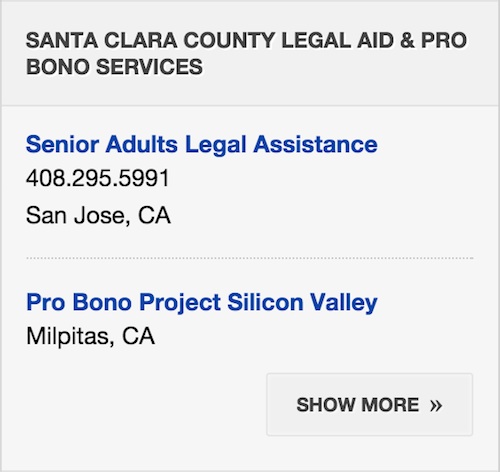 The Justia Lawyer Directory lists thousands of
educational and non-profit legal aid and service organizations nationwide that provide free or low cost
legal services. If you are interested in these low cost legal service organizations, search or browse
the lawyer directory for the area of law and geographic location in which you are interested. In the
right sidebar on every listing page there will be a short list of available Legal Aid & Pro Bono
services that matches your search criteria. To see more providers in your area, click on "Show More."
The Justia Lawyer Directory lists thousands of
educational and non-profit legal aid and service organizations nationwide that provide free or low cost
legal services. If you are interested in these low cost legal service organizations, search or browse
the lawyer directory for the area of law and geographic location in which you are interested. In the
right sidebar on every listing page there will be a short list of available Legal Aid & Pro Bono
services that matches your search criteria. To see more providers in your area, click on "Show More."
How do I contact an attorney in your directory?
There are several different ways to contact lawyers, law firms and legal aid & service organizations listed in the Justia Lawyer Directory:
- Use the Contact Information in Their Profile: On a profile page, you can click on the "Contact & Map" button to see phone numbers and addresses the attorney has listed on his or her profile, as well as a map showing all of their office locations.
- Use the Email Form: If the attorney or law firm has a contact email address associated with their profile, you can click on the “Contact & Map” button and click on the “Email” link just below the map. A form will appear where you can send your message directly to the attorney. For the privacy and security of the attorneys in our database, we do not display their email addresses anywhere on our site.
- Visit Their Website: Many lawyers and law firms have included links to their websites and/or blogs where you can find more information about the lawyer, including additional contact methods. These website and blog links can be found by clicking on the “Website & Blog” button. Blogs offer an excellent way to learn more about a lawyer, their practice, and the law in general. If an attorney or firm has included a link to their blog in their profile, you will be able to view their recent posts directly in the profile.
Compare, Saved, and Recent Tool
How do I compare lawyers in the Justia Lawyer Directory?
A comparison of lawyers in the Justia Lawyer Directory can be initiated from the following places:
- Listings page
- Profile page
- Recently Viewed Lawyer Tab in the Toolbar
- Recently Viewed Lawyer Page
- Saved Lawyer Tab in the Toolbar
- Saved Lawyers Page
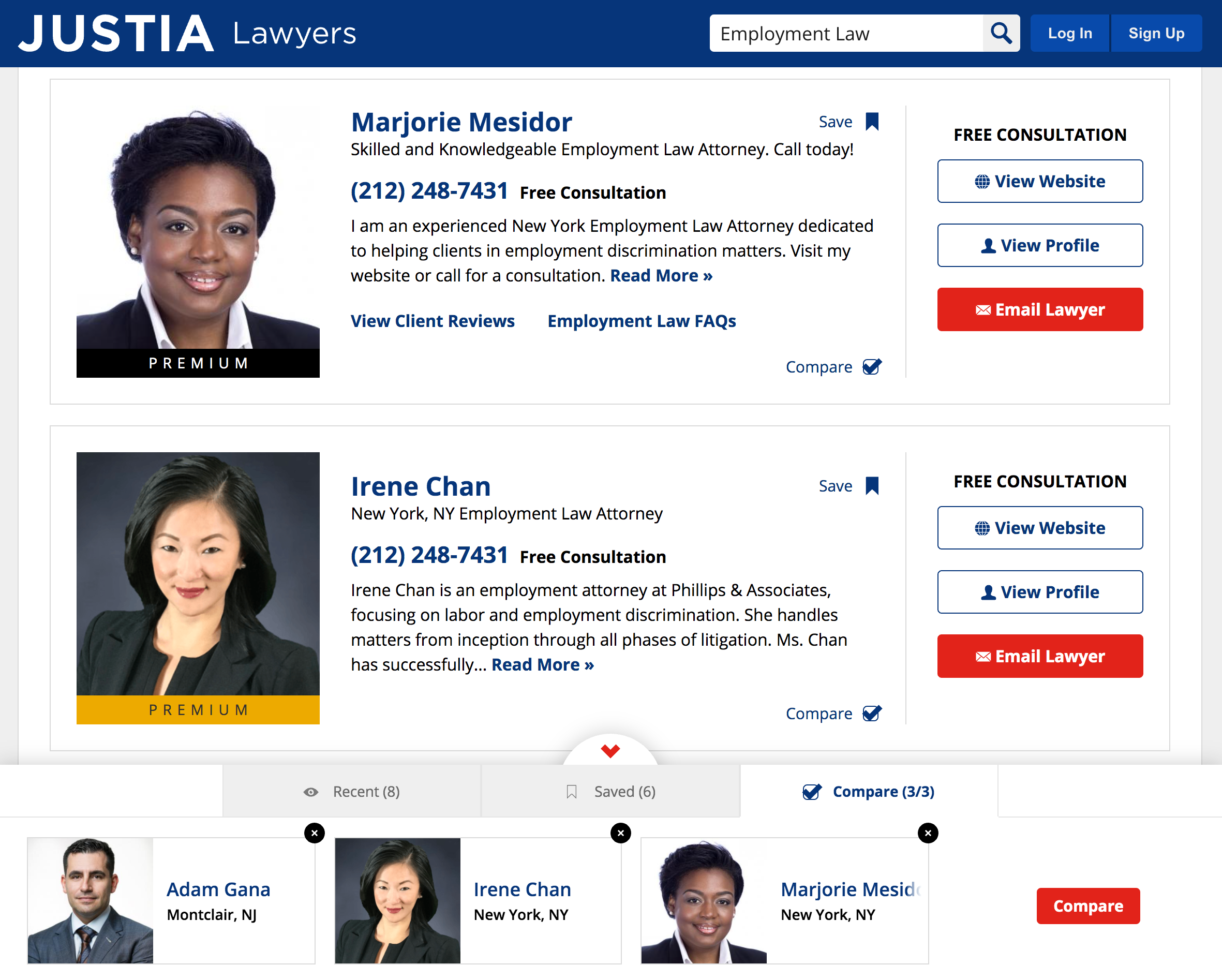
On any of these pages mentioned above, click the Compare checkbox ( ) to add a lawyer to your Comparison
Tab in the Toolbar. The Compare checkbox will become checked (
) to add a lawyer to your Comparison
Tab in the Toolbar. The Compare checkbox will become checked ( ) once you’ve selected a lawyer to compare.
The Comparison Tab in the Toolbar will automatically expand to show you the lawyers whom you’ve chosen
to compare. You can click the Compare checkbox again or click the Remove icon (
) once you’ve selected a lawyer to compare.
The Comparison Tab in the Toolbar will automatically expand to show you the lawyers whom you’ve chosen
to compare. You can click the Compare checkbox again or click the Remove icon ( ) in the Comparison
Tab in the Toolbar to remove the lawyer from comparison if you decide not to compare that lawyer.
) in the Comparison
Tab in the Toolbar to remove the lawyer from comparison if you decide not to compare that lawyer.
How many lawyers can I compare at the same time?
You may add up to three lawyers at the same time to initiate a comparison. After you have clicked the red Compare button located in the Comparison Tab in the Toolbar, the Comparison tool will show the lawyers whom you have selected side by side. You will be shown up to three lawyers to compare side by side. If you are on mobile, you will be shown two lawyers to compare side by side, with the ability to switch between lawyers at the top of the page by using the Lawyer Profile Select box.
How do I save a profile?
You may save a profile by clicking the Save icon ( ) in the following places:
- Listings page
- Profile page
- Recently Viewed Lawyer Tab in the Toolbar
- Recently Viewed Lawyer Page
- Compare page
Lawyers whom you have already saved will show up in the Saved Lawyers Tab in the Toolbar and on the
Saved Lawyers Page or in
the previously mentioned locations with a highlighted Save icon ( ).
).
How can I see all my saved profiles?
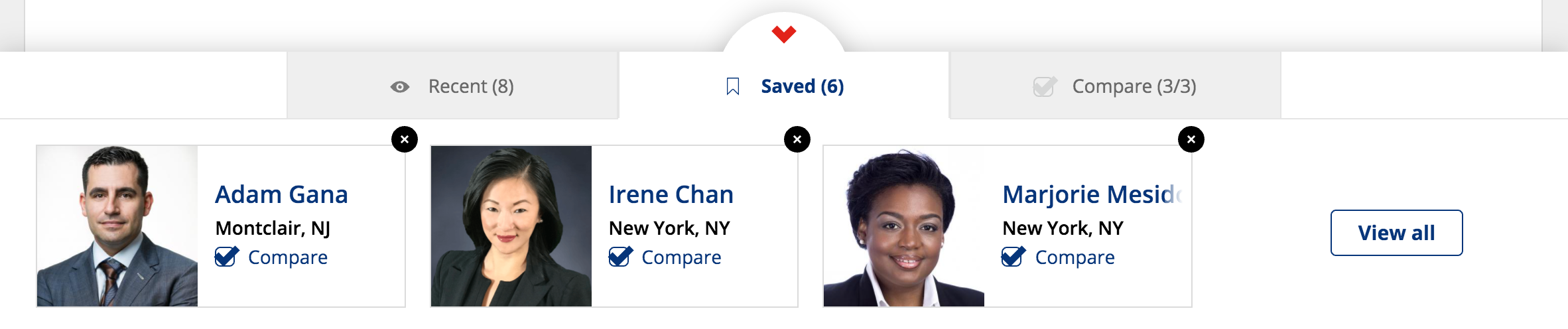
Click on the Saved Lawyers Tab in the Toolbar on the bottom of a page in the Justia Lawyer Directory to expand the Saved Lawyers Tab in the Toolbar. The Toolbar will show your most recently saved profiles in reverse chronological order. Clicking the View All button will bring you to the Saved Lawyers Page, where you can see all your saved profiles.
Can I remove saved profiles?
You can remove a profile from either the Saved Profiles Tab in the Toolbar or on the
Saved Lawyers Page
by clicking the Remove icon ().
How many profiles can I save?
You may save up to 50 profiles. Once you have reached 50 saved profiles, you will be unable to save additional profiles until you remove one or more of your saved profiles. You can manage your saved profiles by going to the Saved Lawyers Page.
How does the Recently Viewed Profiles feature work?
Viewing a profile will automatically add the profile to your Recently Viewed Profiles Tab in the Toolbar. The Toolbar will refresh automatically.
How can I see my recently viewed profiles?
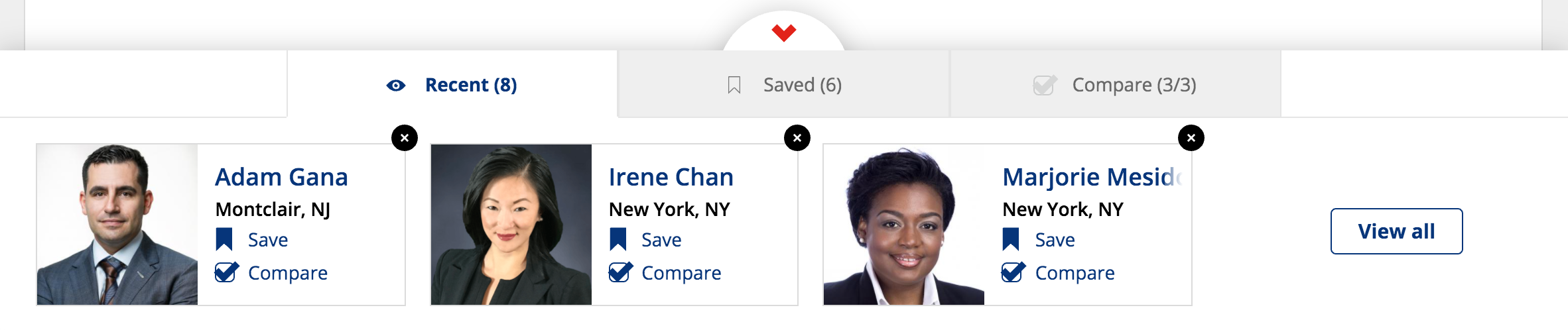
Click on the Recently Viewed Lawyers Tab in the Toolbar on the bottom of a page in the Justia Lawyer Directory to expand the Recently Viewed Lawyers Tab in the Toolbar. The Toolbar will show your most recently viewed profiles in reverse chronological order. Clicking the View All button will bring you to the Recently Viewed Lawyer Page, where you can see all your recently viewed profiles.
Can I remove recently viewed profiles?
You can remove a profile from the Recently Viewed Profiles Tab in the Toolbar or the
Recently Viewed Lawyer Page
by clicking the Remove icon ().
I’m not seeing the recent or saved lawyers from my phone on my computer, or vice versa. How can I see the list of lawyers from one device on another of my devices?
The Recent, Saved, and Compare features are based on cookies. Therefore, you must have cookies enabled in order for the features to work. Furthermore, the features work on each separate device on which cookies are enabled, and the lists of lawyers cannot be transferred from one device to another device.
Claiming or Registering Your Attorney Profile
Can I be listed in the Justia Lawyer Directory?
Any attorney licensed in the United States can have a free profile in the Justia Lawyer Directory. Free profiles are full-featured, and include the ability to add a photo, biographical information, education and experience, websites and blogs, social media profiles, and more. If there is already a profile for you in the Justia Lawyer Directory, you can claim it by clicking the red "Are you [NAME]? Claim your profile to update." link directly below your name on your profile page. If there is not already a profile for you, you may create a new one here.
Is there a fee to be listed in the Lawyer Directory?
No. There is no fee to be listed and have a complete profile in the Justia Lawyer Directory.
Why should I claim my attorney profile?
The Justia Lawyer Directory provides free profiles to lawyers throughout the United States.
Registered lawyers may:
- Complete their profile to show the full extent of their professional experience.
- Help users find your Website and Blog or other social network and directory profiles, such as Facebook, LinkedIn, JDSupra, Twitter, and Avvo.
- Receive online leads from potential clients.
- Receive community participation by providing a fuller, more detailed and complete profile.
- Receive community participation and higher listings by providing free legal information through blogs, wikis, and forums.
- Receive community participation and higher listings by supporting organizations, such as Cornell's Legal Information Institute, that provide free legal information.
- Be included in other lawyer directories, such as the lawyer directory of the Legal Information Institute, that only lists those lawyers who have been authenticated.
How can I get listed in the directory?
You may already have a listing in the directory. Search for your name using the search box at the top of the page. If one of the results is you, click on the red "[First Name], is this you? Claim & update for free!" link on the profile page immediately below your name.
If you cannot find your profile in the Justia Lawyer Directory, you may register as a new attorney by clicking on the “Get Listed” link located on the top right of every page.
Can someone else manage my profile?
It is Justia's policy that each claimed lawyer directory profile in our directory must be associated with the corresponding attorney's email address. The person claiming or updating must have access to the lawyer's personal law firm email address.
You must use a personal firm email address to claim and update your free profile. Your ability to update your profile may be revoked if you claim your profile using an email other than your personal firm email address (such as a generic office email address). If a firm email address is not available, please contact us and we can assist in getting the profile claimed.
If you would like a third-party to claim your profile on your behalf or if you are a third-party looking to claim a profile, please refer to “Claiming on behalf of an attorney” below.
If you have multiple profiles to claim for one firm, please see “Claiming multiple profiles for your firm” below.
Can I claim a profile on behalf of an attorney?
If you wish to have a third-party claim and manage your profile or if you are a third-party that would like to claim and manage a profile on an attorney’s behalf, please note the following.
- We do not create master logins for multiple profiles. Each profile must have its own unique login credentials using the attorney’s firm email address.
- The attorney will be provided a unique login credential so he or she may access and update the profile at anytime and participate in the Justia community. Note, the attorney is free to share their login credentials with a third-party so that party may then login and update the profile.
- The claiming process will not be complete until we receive the attorney's personal firm email address. Either you or the attorney must be able to check the attorney's firm email address in order to access his or her profile to make updates. You may access and update an attorney's profile using any of the three verification methods.
Can I claim multiple profiles for my firm?
To claim the profiles of multiple attorneys in your firm, one attorney or an authorized person in your firm, such as a marketing coordinator or office manager, can claim the profiles by completing the steps below.
- Download and fill out the claim authorization letter.
- Download and fill out the claiming
worksheet. We require the following information for each attorney:
- First name
- Last name
- Firm Email address
- Law school name.
- Law School graduation date.
- Bar Memberships & Bar ID Numbers
- Email the completed claim authorization letter and the completed claiming worksheet to Justia Directory Support. You may also fax the authorization letter and completed claiming worksheet to (650) 649-1865.
Once you have emailed or faxed the required information, please allow up to 7 business days for the claiming process to be complete. Once complete, we will notify you via email that the profiles are claimed and ready for updating. For your privacy and security, we do not provide passwords. We strongly encourage each attorney to log in and reset his or her password to a properly secured password as soon as possible using the Forgot Password Form.
Please note, each profile will have unique login credentials. We do not create master logins for multiple profiles. The person responsible for managing the claiming process may login with the attorney's credentials to update the profiles, or you may ask the attorneys to update their own profiles using their provided firm email address to log in.
By claiming or creating a profile, each lawyer consents to receive email communications from Justia, which may include communications regarding security, the lawyer's account, the lawyer's profile, or other matters. Each lawyer may also receive marketing emails and information from Justia.
After filling out the “Create a Justia Lawyer Directory Profile” form, I am presented with a list of lawyers. What is this?
The list shown is unclaimed profiles that may belong to you. If one of these profiles is yours, please claim it instead of creating a new profile. If you do not see your profile on the list, please click on red button indicating that none of the profiles belongs to you.
Claiming a profile presents me with various claiming options, what are these?
These options are different ways to verify your identity against the information already in the Lawyer Directory. Currently, the available methods are "Claim by Email," "Claim by Phone," and "Claim by Photo." Claiming by email will send a validation email to the email listed. Claiming by phone will allow you to enter a validation number during a phone call to the phone number listed. Claiming by photo will allow you to send Justia proof of your identity and license to practice law, either by uploading a document directly to Justia, or by emailing Justia your photo proof.
How do I claim by email?
From the "Claiming a Lawyer Profile" page, select the email you wish to use for claiming by clicking on the red "Send Email to" button. The full email address is partially hidden in order to protect you from spammers getting your email address; you will see the first two letters of the email address and the domain of the email address. Once you have decided on an email address, click the red "Send Email to" button. An email will be sent to that email address with a verification code and a claim link. From there, you may enter the verification code on the next page or click the link in your email to verify your identity. Once verified, the page will load a registration form where you can continue with the profile registration and editing process.
How do I claim by phone?
From the "Claiming a Lawyer Profile" page, select the phone number you wish to use for claiming by clicking on the appropriate red "Select" button. Select the phone number to call and click the red "Select" button. You will be asked to enter your (the attorney's) personal law firm email address. Using any other email address may result in your access to the profile being revoked.
After you have entered your personal law firm email address, click the red "Continue With Claim" button. You will be presented with a five digit authentication code. Press the red "Call Now" button once you are ready to take the call and enter the authentication code. If your calls are screened by a receptionist or answering service, that person must enter the code provided in response to the automated system.
Enter the five digit code when prompted and press the pound (#) key when finished. After you have verified the authentication code, you will receive an email at the email address you previously inputted. This email will provider you with a link; please click the link or copy and paste the same into a new browser window.
Please select a password and note your password. You will use your personal law firm email address and this password to log in to Justia and to access your profile. After you have created a password, you will be able to edit your profile.
How do I claim by photo?
From the "Claiming a Lawyer Profile" Page, click the red "Send Us Your Proof" button. You will be asked to enter your (the attorney's) personal law firm email address. Using any other email address may result in your access to the profile being revoked.
After you have entered your personal law firm email address, either select a file to upload by clicking the gray "Choose File" button, or select the "Will email or fax a photo copy" radio button to send Justia photo proof at a later time. Once you have made your selection(s), click the red "Submit" button.
After your credentials have been verified, you will receive a verification email at the personal law firm email address you inputted earlier. Click on that verification email and click on the confirmation link to finish claiming your profile.
One or more of the claiming options presented above are not available for me, why?
If one or more of the options to claim and update your profile are not present, it is because we do not have that information in our database. However, the Claim by Photo option will always be available to unclaimed profiles. If you are not presented with the options to Claim by Phone or Claim by Email, please utilize the Claim by Photo option to claim your profile.
How long does it take Justia to validate a photo claim?
Once we have received your identifying information/photo, we may need a few business days to review and approve your profile claim. If your photo proof is insufficient, you will receive an email notifying you as such.
What information will I be expected to give to Justia to claim a profile?
During the registration process, you will be asked for your personal law firm email address, full name, primary address, and primary phone number. Once you have created your new profile, you will be asked to provide proof of your identity and status as a licensed lawyer. You may upload your identifying information directly to Justia, fax the same to the fax number presented to you, or email the same to the email address presented to you. Upon receipt of your identifying information, the Justia Lawyer Directory team will review and process your request. Once accepted, the Justia Lawyer Directory will send you an email notification.
By creating or claiming your profile, you consent to receive email communications from Justia, which may include communications regarding security, your account, your profile, or other matters. You may also receive marketing emails and information from Justia.
What information will I be expected to give to Justia to register a new profile?
During the registration process, you will be asked to create a username and password. We will also collect your email, full name, primary address, and primary phone number. Once you fill out the online registration form, it will be converted to a downloadable PDF, which you can print and fax to Justia along with documents proving your identity and license to practice law. Upon receipt of your fax, the Justia Lawyer Directory team will review and process your request. Once accepted, the Justia Lawyer Directory will send an email notification to the administrative email address provided on the registration form.
By creating or claiming your profile, you consent to receive email communications from Justia, which may include communications regarding security, your account, your profile, or other matters. You may also receive marketing emails and information from Justia.
What is the difference between an administrative email and a contact email?
The Justia Lawyer Directory stores two email addresses.
We use the administrative email to contact you regarding your Justia Lawyer Directory account, for example, to respond to password reset requests.
The contact email address is used for mail being sent directly from your profile by other users, for example, a potential client seeking to contact you through the Justia Lawyer Directory.
The administrative email address is required; the contact email address is optional. Neither email address is publicly viewable on the Justia Lawyer Directory Website. The same email address can be used for both the administrative email and contact email.
By providing your email address you consent to receive email communications from Justia, which may include communications regarding security, your account, your profile, or other matters. You may also receive marketing emails and information from Justia.
Editing/Completing Your Attorney Profile
How do I login?
To login, click the "Sign In" link at the top right of every page. Use the login and password you created when you claimed your profile. If you lose your password you may reset it on the password reset page. If you forgot your password you may reset it on the password reset page, here.
How do I update information in my lawyer profile?
If you would like to update information in your lawyer profile, you must first claim your profile. Once your profile has been claimed, you may edit all information in your profile by following the instructions below.
The Justia Lawyer Directory team will not respond to requests by email or phone to change information listed in unclaimed profiles. This is to ensure that only lawyers who own the profile can change the information within it.
How do I edit my profile?
Once you have claimed/created your profile, you can log in and edit your profile simply by visiting it. To visit your profile, click the blue button with your first name at the top right of any page. In the dropdown menu that appears, click on the “View Account” link. On your account page, click on the link to the profile you wish to edit.
If your profile is not yet filled out, you can click on the individual buttons in the “Improve Your Profile” section to add the respective information to your profile. Click the “Show More” link at the bottom of this section to see all the information you can still add to your profile. Please note that the “Improve Your Profile” section will not appear on profiles with 100% completeness.
If you wish to edit information already included on your profile, click on the “Edit This Section” link found on each section where said information is already included. You can also click on the pencil icon next to these links to add more information or edit already existing information.
Update your practice areas and contact information, add a profile photo and a link to your website and/or blog, and add a short biography that describes your practice and highlights your interests and qualifications.
Justia Lawyer Directory profiles are free and robust. Feel free to log in and update all the information in your profile at any time.
How can I remove my profile from the Justia Lawyer Directory?
If you do not want your lawyer profile to be visible in the Justia Lawyer Directory, you must first claim your profile. On your profile page, click on the red "[First Name], is this you? Claim & update for free!" link found directly beneath your name and complete the claiming process. Once your profile has been claimed, you may either disable or delete your profile from the Justia Lawyer Directory profile editor.
To hide or delete a profile, log in to your Justia account and access the Justia Lawyer Directory profile editor. In the “Core Information” section, click on the “Change Your Profile Status” link at the bottom of this section. If you toggle the Profile Status off, your profile will remain hidden until you re-enable your profile. You may permanently delete your profile by clicking on the “Delete Profile” link. Data contained in a deleted profile cannot be restored. The difference between disabling and deleting your profile is described further below.
What is the difference between disabling my profile and deleting my profile?
Both disabling and deleting your profile remove it from the public listings in the Justia Lawyer Directory.
Disabling your profile is a reversible action. It allows you to hide your profile until you decide you want to show it again. You can still update your hidden profile, but it is not visible to the general public. You can make a disabled profile visible on the Justia Lawyer Directory at any time by re-enabling it.
Deleting your profile will remove your information from the Justia Lawyer Directory permanently and you will no longer be able to login, edit or update your profile. If you want to re-add your profile after deleting it, you will have to create a brand new profile and re-enter the relevant information.
How can I change my password?
After you log in, click on the "My Account" link in the upper right-hand corner to see your accounts page. Underneath the “Account Information” heading on your accounts page, click on the “Change Password” link and follow the prompts to change your password.
What are the ideal dimensions for an attorney photo?
You should upload a photo that is a minimum of 320 pixels by 320 pixels for your attorney profile photo. For maximum clarity on high resolution displays, the photo should be a minimum of 640 pixels by 640 pixels. If you upload a photo with larger dimensions, the editing tool will resize the photo to fit within these dimensions. We accept photos in JPG and PNG formats.
What type of photo should I upload to my profile?
You should upload a professional photo with your headshot or another image with your likeness. Photos that include law firm or third-party branding, animals, landscapes, plants, objects or other text may be removed at our discretion. Photos should not have a frame, colored border or other artificial border. Presenting a professional photo builds trust in a lawyer and confidence in the credentials presented in the profile. As an added benefit, your photo is also included in the geographical and practice area listings of the directory, and can help distinguish your profile from those of your peers who have not yet added a photo.
How do I change the name listed on my Justia Lawyer Directory profile?
Name changes must be made by the Justia Lawyer Directory support team. You may send your request to change your name by clicking the "Contact Us" link at the bottom of any page on the site.
How long will it take see the updates I made to my profile?
Our databases are updated every 24 hours. It may take up to 24 hours to see recent updates made to your profile reflected on the live site.
Practice Area Services
Where can I find a list of all the Practice Area Services in the Justia Lawyer Directory?
You can find a list of all the Practice Areas Services we currently offer here. We may update the list of services as we get feedback from lawyers and directory users.
How can I find lawyers providing specific services?
You may find lawyers providing specific legal services by searching for the service in the search box where it says “Search Legal Issue or Lawyer Name.” If you input one of the services, we currently offer, use the dropdown list to select the service.
You will be taken to a list of lawyers offering the service you selected. You can use the pills at the top of the results page to further narrow your search results.
Will you add new services for specific legal needs? Will you update associations between services and practice areas?
We will be adjusting and adding additional Practice Area Services over time. You may contact Justia Lawyer Directory Support if you wish to make suggestions or provide feedback. However, we make no guarantee that we will add a service just because it is suggested. We will always have the current full list of services here, so check the page for updates.
Why does my unclaimed profile not appear in searches for Practice Areas Services?
Only lawyers who have claimed their profiles in the Justia Lawyer Directory may add or remove services from their profiles. If you need help claiming your profile, feel free to browse the Justia Lawyer Directory FAQ here.
How do I add or remove services on my Justia Lawyer Directory profile?
Only lawyers who have claimed their profiles in the Justia Lawyer Directory may add or remove services from their profiles.
To add or remove services from your claimed Justia Lawyer Directory profile, log in and edit your profile. Click on the “Edit This Section” link or pencil icon in the Practice Areas section of your profile.
If there are no practice areas on your profile, click on the “Add Practice Area” button. Select a practice area from the dropdown menu. Use the checkboxes to select or unselect the services associated with the practice area. Once finished modifying the services, click on the blue “Save” button to save your practice area and related services.
To add or remove services related to a practice area already existing on your profile, click on the pencil icon next to the practice area you wish to modify. Select or unselect the services related to the practice area being modified. Once finished modifying the services, click on the blue “Save” button to save your practice area and related services.
There are no recently viewed profiles.
There are no saved profiles.
There are no profiles to compare.


